
AI Search / 8 min / Published / Last updated
Why AI Can't See Your Website (The JavaScript Problem)
By JV Ortiz
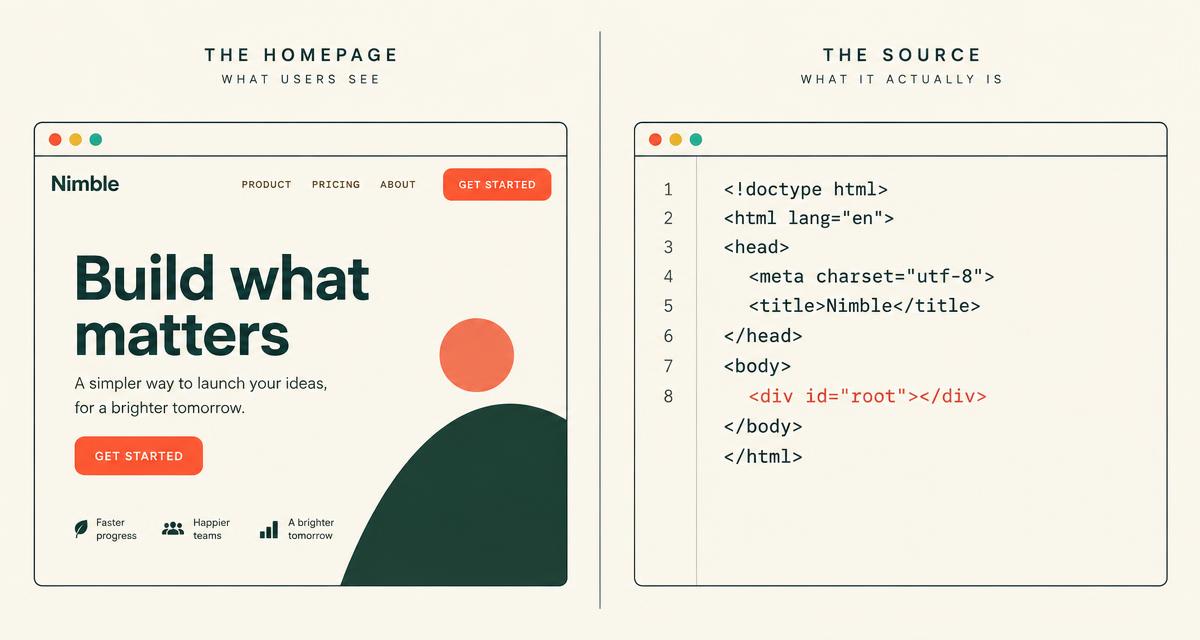
You built a good site. It loads fast, it looks sharp, and customers get it. Then you ask ChatGPT about your category and you're not there. You ask about your company by name and it guesses, or admits it doesn't know. A website not showing in ChatGPT feels like a brand problem or a content problem.
Often it's neither. It's plumbing.
And it's one of the most common things we find when we audit early-stage sites. The founder has done the hard part (built something people want) and the site quietly hides it from every machine that matters.
01
The problem in plain English
Most modern startup sites are built with React, Vite, Lovable, Bolt or something similar. By default, many of these tools produce what's called a client-side rendered site, also known as a single-page app.
Here's what that means. When anyone requests your pricing page, your server sends back a nearly empty HTML file. It contains a title, a single empty container, and a link to a JavaScript bundle. The browser downloads that bundle, runs it, and the code builds your page on the spot. Headlines, features, testimonials, pricing: all of it is assembled after the fact.
Think of it as flat-pack furniture. You don't ship a table. You ship a box of parts and an instruction booklet. A human's browser reads the booklet and builds the table in a few hundred milliseconds. Nobody notices.
A crawler that doesn't read the booklet just sees a box.
02
What AI crawlers actually do with JavaScript
This isn't theory. A 2024 study by Vercel and MERJ found that major AI crawlers, including OpenAI's and Anthropic's, fetch JavaScript files but do not execute them. So any content that only appears after client-side rendering is invisible to them.
Googlebot is different. It does render JavaScript. But rendering can be delayed, and it's less reliable than plain HTML. So you're not safe with Google either. You're just in a slower, more fragile line.
That's the honest answer to "why doesn't ChatGPT know my website?" In many cases, it has never actually read it.
03
The three quiet failures
Client-side rendering SEO problems usually show up as a trio:
- An empty body. The raw HTML has no words in it. No headings, no copy, no internal links for a crawler to follow.
- One title for every page. The same HTML file is served for every URL, so every page shares the homepage's title and meta description until JavaScript swaps them in. Crawlers that don't run JavaScript never see the swap. This is why Google sometimes shows the same title for every page on a site, and why AI tools can't tell your pricing page from your blog.
- A canonical pointing home. Some templates hard-code a canonical tag pointing at the homepage. Now every page on your site is telling search engines, "the real version of me is the homepage." Search engines tend to listen, and your other pages drop out.
Any one of these hurts. Together they make a 40-page site look like a single blank page.
04
Website not showing in ChatGPT? Check these symptoms
You don't need to be technical to spot the pattern. Look for:
- AI tools don't cite you, even when asked about you by name, or they describe you using only third-party sources, sometimes wrongly.
- Pages aren't indexed. Google Search Console lists many of your URLs as not indexed or as duplicates of another page.
- Every result has the same title. Search site:yourdomain.com in Google. If every result shows your homepage title, you have the shared-meta problem.
- Link previews all look identical. Paste your pricing page and a blog post into Slack or LinkedIn. If both previews show the homepage title and image, those platforms aren't running your JavaScript either.
If two or more of these sound familiar, run the test below before you spend another dollar on content.
05
The 2-minute self-test
You need a browser and, optionally, a terminal. That's it.
- View the source, not the page. Open any important page, right-click and choose "View Page Source" (or type view-source: in front of the URL). Don't use "Inspect." Inspect shows the page after JavaScript has run, which is what humans see, not what crawlers see.
- Search for a real sentence. In the source, press Ctrl+F (Cmd+F on a Mac) and search for a sentence you can read on the page, like your main headline. If it isn't in the source, a crawler that doesn't run JavaScript can't see it.
- Try curl if you have a terminal. Run curl -s https://yoursite.com/pricing | grep -i "your pricing headline". Empty output means the text isn't in the HTML your server sends.
- Check titles and canonicals on three URLs. In the source of your homepage, pricing page and one blog post, find the title tag and the rel="canonical" link. Each page should have its own title, and each canonical should point to that page's own URL, not the homepage.
If your headline is missing, or all three pages share one title, you've found your problem.
06
How to fix it
The goal is simple: every public URL should return complete, readable HTML on the first request, with no JavaScript required. There are a few ways to get there.
Prerendering or static generation
Prerendering builds the finished HTML for each page ahead of time, usually when you deploy. The crawler gets a full page instantly. The browser still loads your JavaScript afterward, so the site stays interactive.
For a marketing site (home, pricing, features, about, blog), this is usually the best fit. Those pages don't change per visitor, so there's no reason to build them on the fly. Frameworks like Next.js, Astro and Nuxt support static generation out of the box, and there are prerendering options for Vite and React setups.
Server-side rendering
Server-side rendering builds the HTML on the server for each request. It suits pages that change often, but it's heavier to run, so use it where you need it.
A practical split for most startups: keep the logged-in product as a client-side app (it doesn't need to be indexed) and make the public marketing pages static.
Per-route meta tags
Every URL needs its own title, meta description and social preview tags, present in the raw HTML. Not injected later.
Self-referencing canonicals
Each page's canonical should point to itself. Remove any hard-coded canonical that points every page at the homepage.
A current sitemap
Publish an XML sitemap that lists every public URL, reference it in robots.txt, and submit it in Google Search Console. When you add a page, it should appear in the sitemap automatically.
A robots.txt that lets AI bots in
Make sure you're not blocking the crawlers you want. A minimal version:
User-agent: GPTBot
Allow: /

User-agent: OAI-SearchBot
Allow: /

User-agent: ClaudeBot
Allow: /

User-agent: PerplexityBot
Allow: /

Sitemap: https://yoursite.com/sitemap.xml
GPTBot and OAI-SearchBot belong to OpenAI, ClaudeBot to Anthropic, PerplexityBot to Perplexity. Google-Extended controls whether your content is used for Gemini training, so make that one a deliberate choice.
While you're in there, look for stray noindex tags. In our own fintech client work, a leftover noindex tag had been blocking indexing, and removing it was step one before anything else could work.
07
What to ask your developer
You don't need to learn the stack. You need to ask the right questions:
- Does our marketing site serve full HTML without JavaScript? Can you show me the curl output for the pricing page?
- Does every URL have its own title, meta description and canonical in the raw HTML?
- Are we prerendering, statically generating or server rendering, and which pages does that cover?
- Is there a noindex tag or header anywhere it shouldn't be?
- Is the sitemap generated automatically, and does robots.txt allow GPTBot, OAI-SearchBot, ClaudeBot and PerplexityBot?
- When we add a new page, does it get prerendered and added to the sitemap without anyone remembering to do it?
A good developer can answer all six in one conversation. The fix is often days of work, not months.
08
Fixing rendering is the floor, not the ceiling
Being readable doesn't make you recommended. It makes you eligible. Once machines can see your pages, the work shifts to what's on them: clear answers, consistent descriptions of what you do, and mentions on sites that AI engines trust. We cover that in our guide to getting recommended by ChatGPT and Perplexity, and the broader shift in how AEO differs from SEO.
New to all this? Start with our SEO basics for early-stage startups. Your website is one of the few owned assets that compound, but an asset nobody can read doesn't compound. It just sits there.
09
What to do this week
- Run the 2-minute test on your homepage, pricing page and one blog post.
- Open yoursite.com/robots.txt and check which bots are allowed.
- Send your developer the six questions above.
- After the fix ships, rerun the test, resubmit your sitemap in Search Console, and start asking ChatGPT and Perplexity the questions your buyers ask, so you have a baseline.
10
Frequently asked questions
Why is my website not showing in ChatGPT?
The most common technical reason is that your site relies on client-side JavaScript to display content, and AI crawlers don't run it. Other causes include robots.txt blocking AI bots, noindex tags, or simply too few trusted sources mentioning you. Check rendering first, because nothing else works until that's fixed.
Can Google see my JavaScript website?
Usually, yes. Googlebot renders JavaScript, but rendering can be delayed and is less reliable than plain HTML. Serving full HTML removes that risk for Google and for AI crawlers at the same time.
Do I need to rebuild my Lovable or Bolt site?
Not necessarily. Often the fix is adding prerendering for public pages, or moving just the marketing pages to a static framework while the product stays as it is. Ask your developer which path is less work for your setup.
Is prerendering the same as cloaking?
No. Cloaking means showing search engines different content from what users see. Prerendering serves the same content, just built ahead of time, which is exactly what crawlers want.
11
Let's make sure machines can read you
We audit early-stage sites for exactly this, then fix the foundation so your content has a chance to rank and get cited. If your site is invisible to AI, that's the first thing we'd sort out together.
Keep reading

Philosophy / 5 min
The Compounding Company: Why We Build Before We Buy

Brand Story / 5 min
The Third Answer: How to Find the Story Only You Can Tell

Market Research / 6 min
Your ICP Is a Guess Until Strangers Prove It

Growth Strategy / 5 min
Your Ads Didn't Fail. Your Foundation Did.

Hiring an Agency / 8 min
What Does an Organic Marketing Agency Actually Do?

Hiring an Agency / 8 min
9 Questions to Ask Before Hiring an Organic Growth Agency